Reference No: AHI-26
Version No: 06.01.03-00
Details
Support to print the Invoice Total Amount in words in Invoice Prints. Each invoice displays the numerical grand total in words and also supports multi-language.
|
CID |
Description |
Invoice Type |
| 55552 | Print Amount In Words In Invoice Prints, when used with component type as 113, in 5th field. | All Utilized Invoice Forms |
Do the Form setup in the Maintenance Module.
Note:
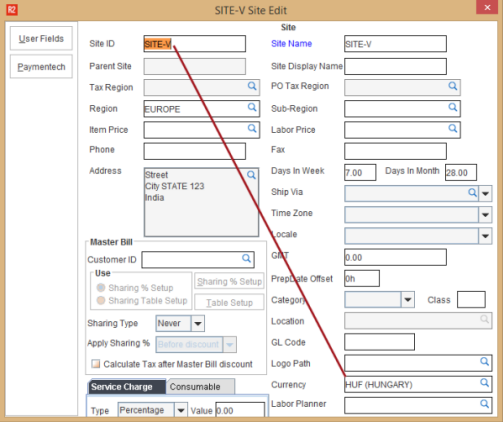
Make sure Site Currency is tagged in the Maintenance module.
In account module, create an order.
Add the items, enter Unit Price and discount (if needed) for each item line in the order.

Note: Ensure to tag Tax region.
Invoice the order.
Add the invoice to a batch and then post the batch.
In Accounts module, Go to View > Invoices.
Search the Invoice and click Print.
Select the form and then click the Print.
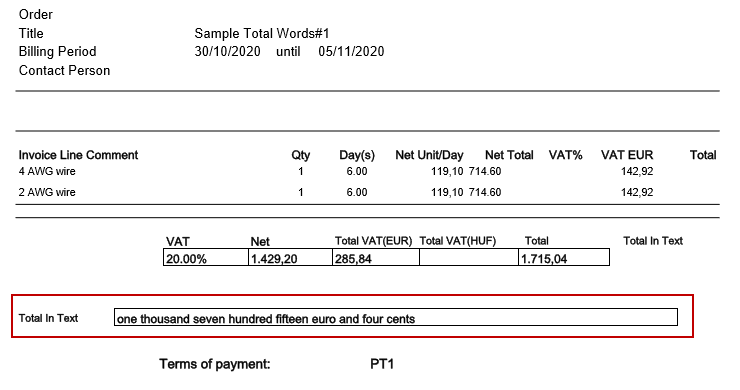
Open the Invoice print and it displays the Grand Total in Words.
Notes:
New component type 113 which prints Amount/Number CID value in words is supported in Invoice Prints.

Header CID: Any amount CID with Component Type 113 will print it in words.
Grid CID: Any Grid CID with Component Type 113 will print it in words.
Also, support is extended to use the property ‘SUPPRESSDECIMALZERO' for component type 113, which suppresses the zero from numbers while printing in words.
This property is to be defined in the 39th Column in the UI file.
If "SUPPRESSDECIMALZERO=TRUE" example:
if value = 5.00 → will print as ‘five’
if value = 5.70 → will print as ‘five point seven’
if value = 5.75 → will print as ‘five point seven five’
If "SUPPRESSDECIMALZERO=FALSE" or not specified example:
if value = 5.00 → will print as ‘five point zero zero’
if value = 5.70 → will print as ‘five point seven zero’
if value = 5.75 → will print as ‘five point seven five’
Amount CIDs when multi-currency is enabled will print based on currency selection on form type options dialog, Amount will be printed words in respective currency. To have this interpreted in currency in column no 23 following values has to be present:
When multi-currency is enabled, for component type 113:
If 23rd column has 0 = Prints number in words without currency
Example: 106325.98 will print in words as 'one hundred six thousand, three hundred twenty-five point nine eight'
If 23rd column has 1 = Prints number in words with currency
Example: 106325.98 will print in words as 'one hundred six thousand, three hundred twenty-five U.S. dollars and ninety-eight cents'.
When multi-currency is not enabled, for component type 113 :
If 23rd column has 0 or 1 = Prints number words without currency
Example: 106325.98 will print in text 'one hundred six thousand, three hundred twenty-five point nine eight'