Reference No: AHI-15
Version No: 06.01.03-00
Details
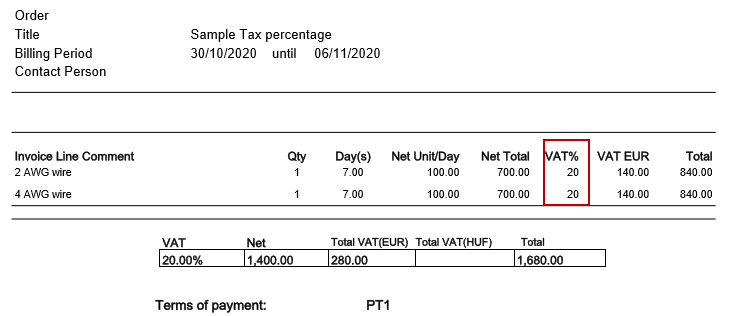
This enhancement is to print the Tax% for each individual item line in the invoice prints. If there are multiple line items on the order, each line displays the percentage associated with the tax schedule of the tax region.
Note:
The tax % of the each invoice item line rounds to two decimal places.
Use the CID with Component Type 20 since it is not an amount. With this if you use:
SUPRESSZERODECIMAL=TRUE parameter value in 39th column it will exclude decimal places if the decimal is .00 (zeros).
0/1/2 in 16th field for data alignment as left/center/right.
When ‘T’ check box is false for an invoice line or Order Tax Applicable is false (i.e. non-taxable line), the Tax % prints either '0 ' or blank.
In CR Memo's prints Tax % will be in positive format since it is not an amount.
When more than on Tax Schedule is applicable for the line, it prints the cumulative Tax % of both the schedules
Example: Sch#1 10 % and Sche#2 5 %, the CID will print 15.
When same product lines having ‘SCH1-10%’ and ‘SCH2 – 5’ % gets merged, the CID prints the cumulative tax percentage of unique schedules as 15 (10 + 5).
|
CID |
Description |
Invoice Type |
| 80023 | Print the Invoice Tax% for each individual line item | Invoice Sale/L&R/ Credit Memo Sale/L&R/ Debit Memo Sale/ L&R Standalone Invoice. |
Do the Form setup in the Maintenance Module.
In R2 > Accounts, create an order and add the items.
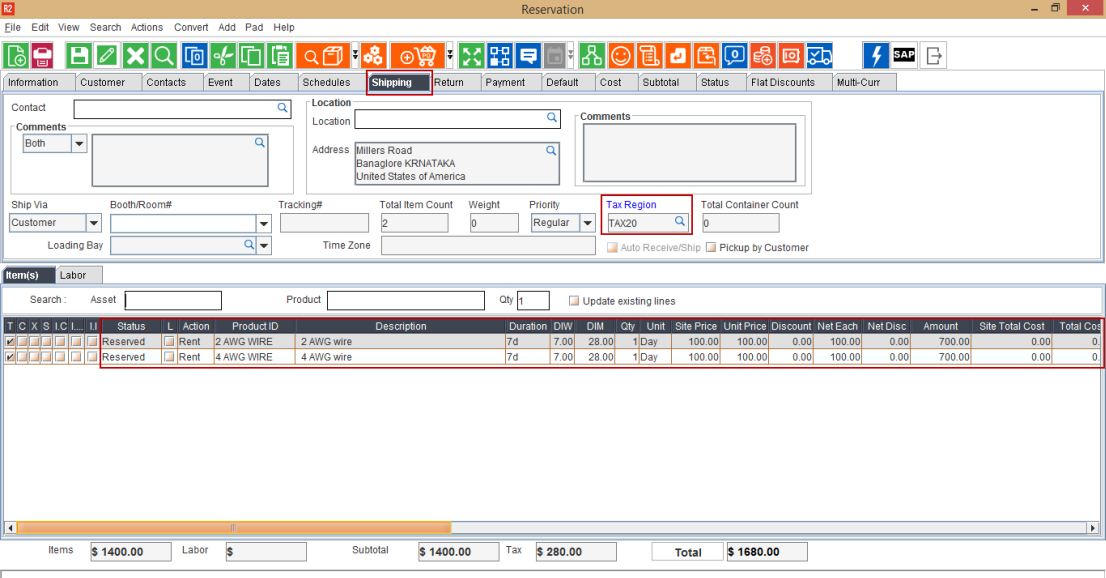
Tag ‘Tax region’ in shipping section (20% tax is considered for sample workflow).
Generate the Invoice.
In Invoicing module, create batch and post the generated Invoice.
In Accounts module, Go to View > Invoices.
Search the Invoice and click Print button.
Select the form and then click the Print button.
Open the Invoice Print and the Tax% of each invoice item line displays as shown below.